Your digital garage — and a private maintenance history
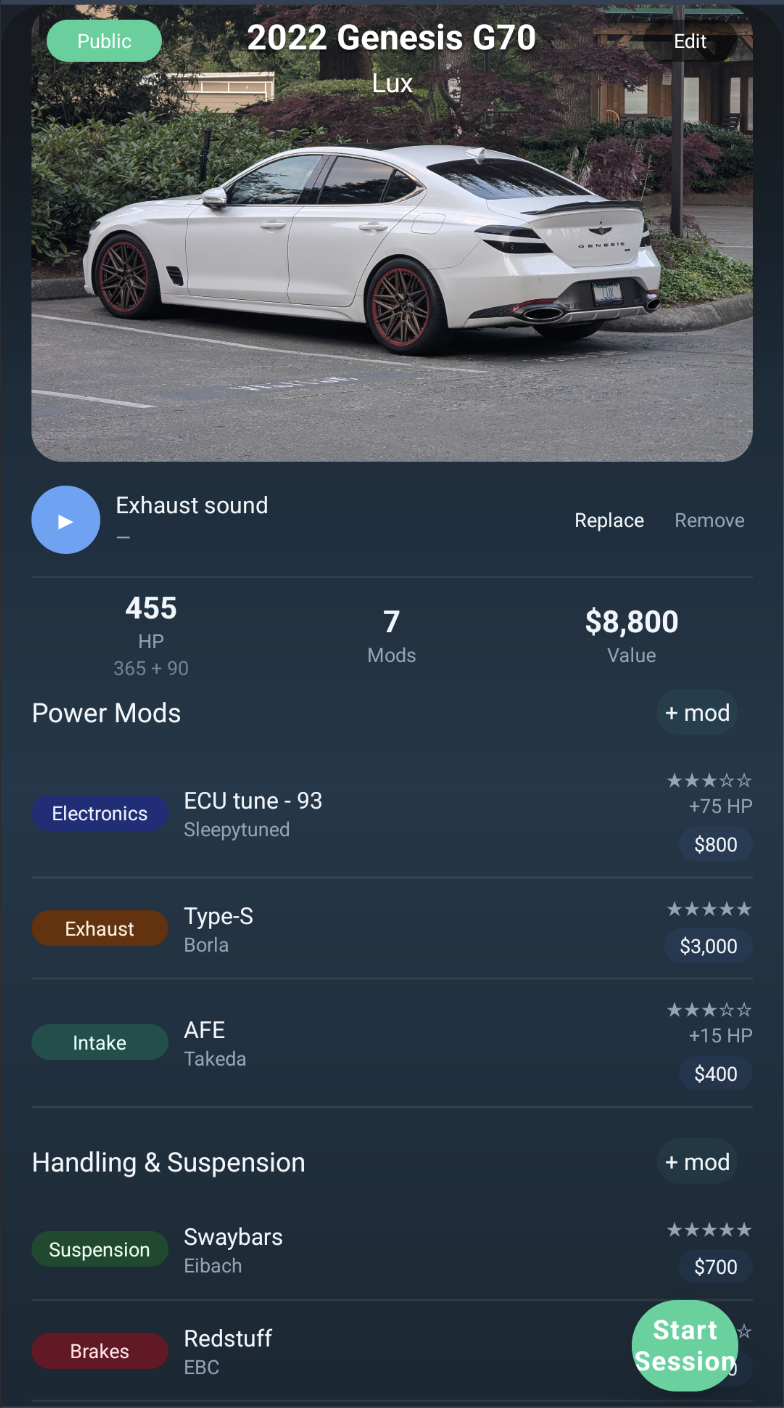
Drivurs Garage is where you manage your vehicles (“builds”), photos, and modifications. It also includes maintenance tracking — service visits, history, and schedules.
Your garage, maintenance logs, and schedules live in the Drivurs app.
No app? Scroll for the public-only build log + maintenance checklist.
Vehicles + photos
Keep a clean garage gallery with vehicle details, cover photos, and an organized photo set.

Modifications (if enabled)
Add, edit, and remove modifications when mod tracking is enabled in your build.
Maintenance logs + schedules
Log service visits and manage interval schedules per vehicle. Maintenance is intended to be owner-only.
Track your current setup
- Best for: keeping your build’s current state readable on mobile—without spreadsheets.
- You get: vehicles, photos, and (when enabled) modifications you can keep up to date.
- Also included: maintenance logs + schedules intended to stay owner-only.
What Garage includes
- Vehicles gallery + details (make/model/year, nickname/trim where available)
- Photo management (cover photo, reordering, removals)
- Modifications (add/edit/remove) when mod tracking is enabled
- Maintenance service visits (date, odometer, services, notes; vendor/cost/attachments where supported)
- Maintenance schedules (interval reminders by time and/or distance)
- Privacy: maintenance history is intended to be owner-only
Why spreadsheets fail for real builds
Spreadsheets are great for budgets, but they break down for builds because the workflow is too heavy on mobile. When tracking takes longer than installing the part, it stops happening.
No structure
Mods get mixed with maintenance, notes, and “future plans,” and you lose the actual current setup.
No recall
A part name in a cell doesn’t tell you why you chose it, what changed, or what you’d do differently next time.
Too much friction
On install day, your phone is the tool—not a 12‑column sheet you’ll forget to update.
How to track a build in Drivurs
Keep the loop simple: add a vehicle, keep photos current, track mods when enabled, and log maintenance so future-you can trust the history.
1) Add your vehicle + visibility
Create a vehicle and set what’s public vs private. Maintenance history is intended to stay owner-only.
2) Photos: cover + reorder
Upload photos, choose a cover image, and keep the gallery clean and recognizable.
3) Track mods (when enabled)
Add modifications to a vehicle and edit or remove them as your setup changes (when mod tracking is enabled).
4) Log service visits + schedules
Record service visits with date and odometer, then set interval schedules so you can review what’s due soon/overdue when available.
Who this is for
- Owners who want a clean garage for vehicles + photos
- Drivers who want a consistent maintenance history per vehicle
- Builders tracking modifications when mod tracking is enabled
Who this is not for
- People who only want a photo album with no build details
- Teams needing enterprise fleet maintenance software
- Anyone expecting automatic versioned history for removed parts
No app? Public-only build log + maintenance checklist
If you’re not using the app yet, you can still keep a simple, public-only record that helps you stay consistent without oversharing personal info.
- Current setup: year/make/model + a short list of what’s installed today (keep it honest and up to date).
- Photos: one clear cover photo + a few detail shots; avoid posting plates/VIN/home address.
- Service visits: log date + odometer + what was done (oil, brakes, tires, fluids) and keep receipts in one place.
- Intervals: set time/mileage reminders in your calendar so you don’t rely on memory.
- Notes: record why you chose a part/service and what you’d do differently next time.
FAQ
Can I track maintenance too?
Yes. Garage includes maintenance tracking like service visits and schedules (where supported). Maintenance is intended to be private to the vehicle owner.
Do I have to share my build publicly?
No. Each vehicle can be public or private. Keep it private while you build and share when you’re ready.
Can I track modifications?
Depending on your build, you can add, edit, and remove modifications for a vehicle and open details in a separate view.
Is maintenance public if my vehicle is public?
No. Maintenance history is intended to be owner-only, even if other vehicle details are visible elsewhere.
Proof of work.
Keep your vehicles private while you build. When you’re ready, set a vehicle public so it can be visible to other drivers — while keeping maintenance history owner-only.