
See exactly what changed before the next pass.
TuneTiresFuel
Connect a supported RaceBox device to record acceleration times on a track or closed course. Compare runs with the car, setup, and run checks alongside the result.
0-60
Launch and setup tracked.
Run proof
Record the run, inspect the graph, check the road slope and GPS signal, confirm the vehicle and setup, then compare runs that pass review.
Live RaceBox session
Ready. Run. Review. Watch a pass move from a connected vehicle to a result you can inspect, compare, and keep with the exact setup that produced it.Choose the Garage vehicle and current setup before the session starts.
Connect RaceBox and confirm the device is ready before the first launch.
Speed, elapsed time, and the 0-100 split keep updating while the car is still moving.
Keep elapsed time, trap speed, road slope, and the attached vehicle together.
Open the speed graph, run checks, and split times before saving or sharing.
Run review
Select the Garage vehicle
Connect RaceBox and confirm readiness
Inspect the graph, road slope, and GPS signal
Publish eligible results
Inside the app
The session gives you the time and the trace that produced it, the timeslip breaks out every split behind that number, and an imported datalog puts the logged channels alongside the same pass.

The time, with the trace that produced it
Illustrative example run. Quality labels apply to this result. AI-assisted image.View larger example ↗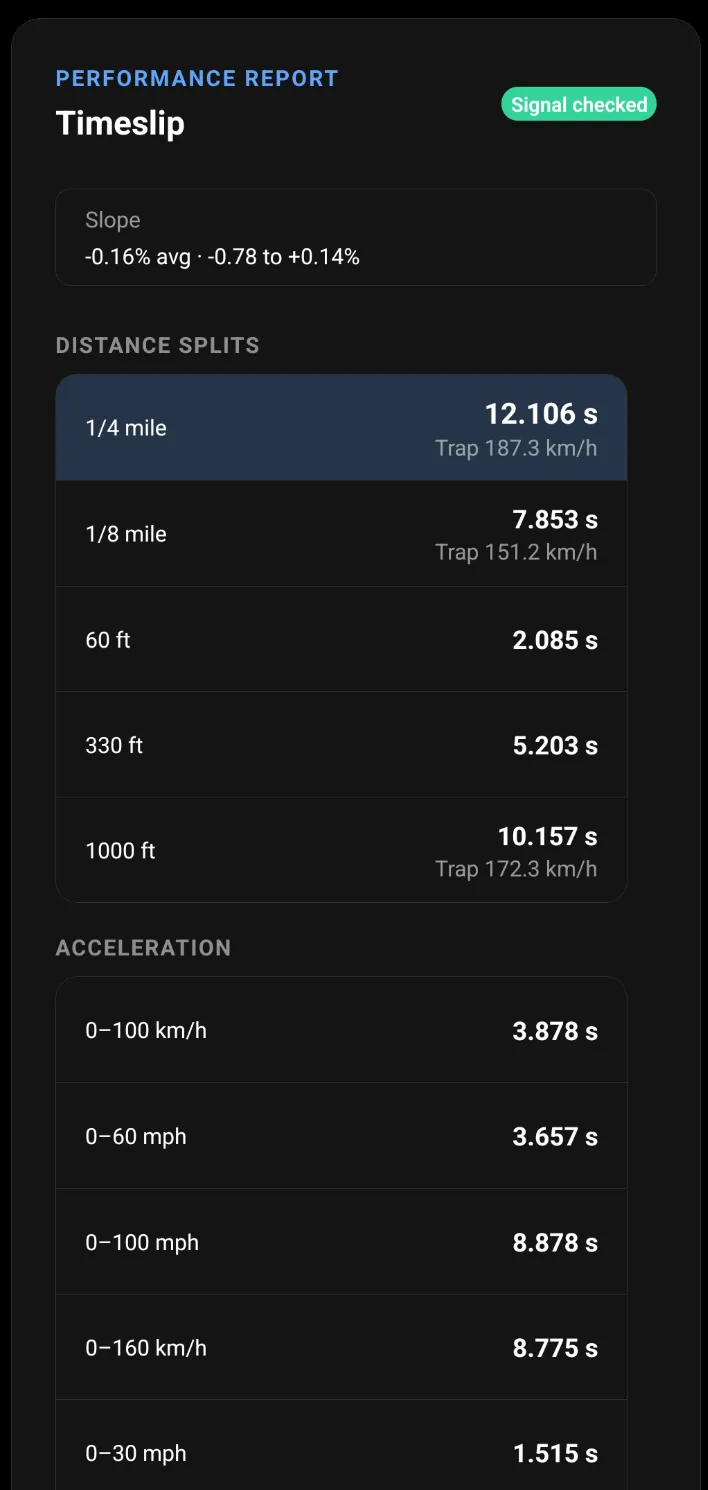
Every split, not just the headline number
Example run. Use only in legal, controlled environments.View larger example ↗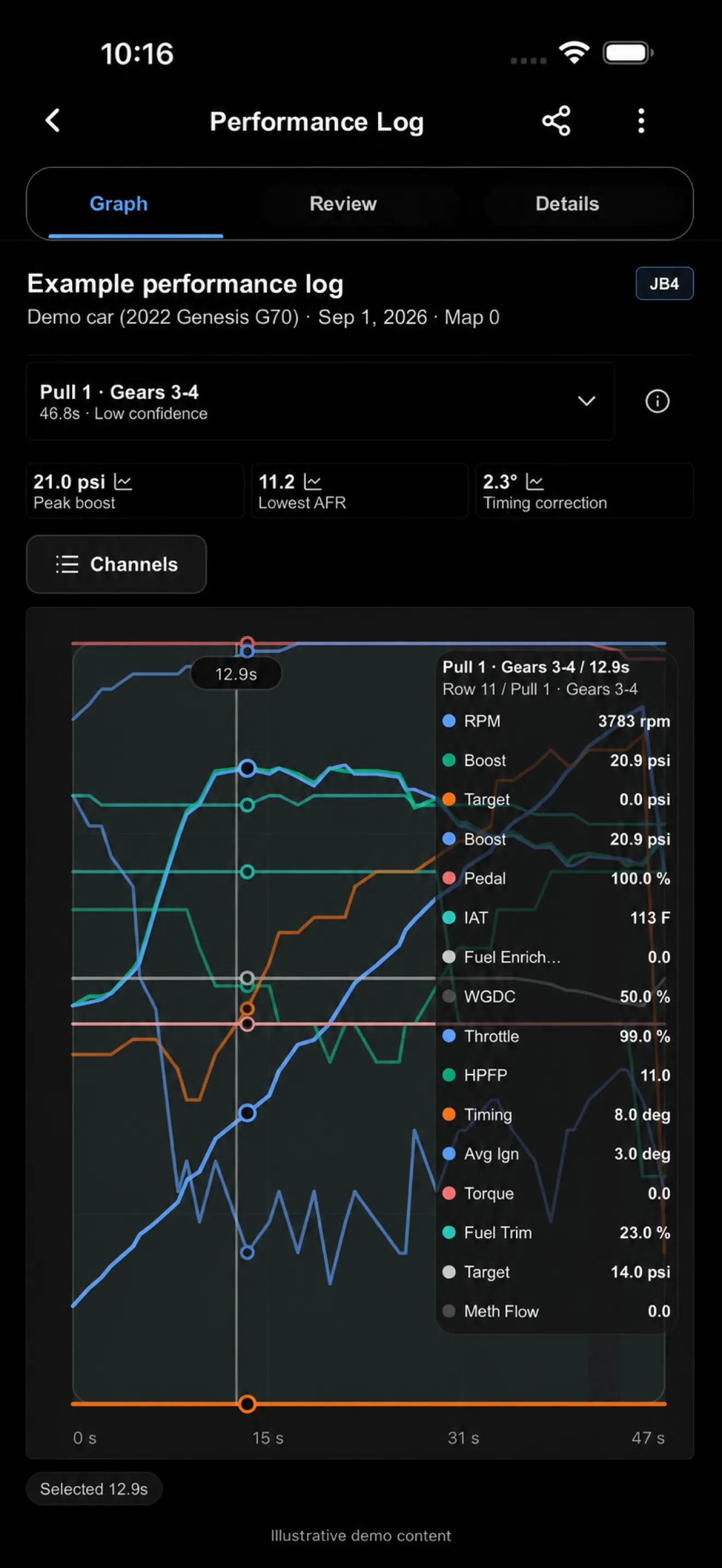
Datalogs read alongside the run
Illustrative demo. This log is labeled Low confidence. AI-assisted image.View larger example ↗In the app
Show 0-60, quarter mile, trap speed, road slope, GPS signal quality, the attached vehicle, and eligibility before comparing the result.
Leaderboards
Browse rankings by metric, narrow the field to comparable vehicles, and open the underlying published run before the number earns your trust.
01 · Browse
Move between supported performance metrics instead of mixing unlike results into one comparison.
02 · Compare
Use verified-only, grade-limit, make, model, and vehicle filters to compare the right results.
03 · Verify
Review vehicle context, timing, grade, and the published run details behind an eligible result.
Leaderboards show published, eligible results. Private runs stay private until their owner chooses to publish.
See how Run Viewer and leaderboards connectLive product preview
Verified runs grouped by vehicle, not screenshots
Every rank can jump back into the underlying run details.
Lux · tuned AWD sedan
@sleek · Trap 125.2 km/h
M340i xDrive
@nightpull · Grade 0.12%
Golf R
@damptrack · Published run
Change log
Setup
Know what actually changed.
Install a tune, add tires, change fuel, go back out, and see exactly how it affected your times.
Run history
All runs
Most people remember their fastest run. Drivurs remembers all of them.
Track improvements over time, compare sessions, and see how every modification impacted performance.
Comparison
Similar builds
Understand where your car stands.
See verified times from other owners running similar platforms, power levels, and setups.
What you can do
Racing makes setup changes, repeat sessions, and personal-best progress easy to compare without spreadsheets.
Audience
Measure 0-60, 60-130, 100-200, 1/8-mile, 1/4-mile, and trap speed passes from the same racing page.
Track launches, roll races, sessions, setup notes, run graphs, RaceBox readiness, and verified result details.
Connect every run to the Garage vehicle so tunes, tires, fuel, and other modifications explain what changed.
Build a history of your car instead of keeping personal bests, setup notes, and screenshots in separate places.
Compare verified results against similar builds, with the full run available behind every leaderboard time.
What Racing includes
Measure a pass, inspect the result, review a supported data log, and compare it with your own history or similar builds.
How you improve
Record the change, capture the next pass, compare the result, and keep the learning with the car.
Add the tune, tire, fuel, or setup note to the Garage vehicle.
Run the same benchmark again with RaceBox and the new setup attached.
Compare splits, graphs, trap speed, and consistency instead of two screenshots.
Keep the better result, learn from the change, and go after the next personal best.
Performance Logs
FAQ
Straight answers about comparing runs and reviewing supported Performance Logs.
Yes. Racing supports verified times, vehicle-specific rankings, and similar-build comparison when eligible records are available.
Drivurs supports JB4 logs and can expose gated beta importers for MHD, bootmod3, COBB Accessport, and HP Tuners. Source availability can vary by account and release.
No. Performance Logs help you graph, inspect, and compare supported data logs. They do not provide tuning instructions.
Download
Keep every launch, setup change, RaceBox result, and Performance Log close enough to understand what made the car quicker.